
Judging in 2026: the rising complexity
Contests are bigger, more diverse, and frankly, more complicated than ever before. We’ve moved past local science fairs and small-town baking competitions. Now we’re seeing massive esports tournaments, global design challenges, and increasingly sophisticated academic competitions. This isn't just about more entries; it's about managing diverse media formats, complex judging criteria, and a wider range of participant expectations.
This growth in scale and complexity puts immense strain on event organizers. What once could be managed with spreadsheets and email is now a logistical nightmare. Maintaining fairness, transparency, and efficiency requires dedicated tools. Relying on manual processes introduces opportunities for error, bias, and ultimately, a diminished experience for both participants and judges.
The 2026 Tools Competition focused on learning engineering and administration software. It proved that organizers are moving away from manual entry. Most new tools prioritize judging workflows and data analysis because that is where human error usually ruins a contest.
This isn’t about adding "nice-to-have’ features; it"s about building essential infrastructure. Contest organization in 2026 demands a thoughtful tech stack. The days of successfully running a large-scale contest without dedicated software are, for all practical purposes, over.
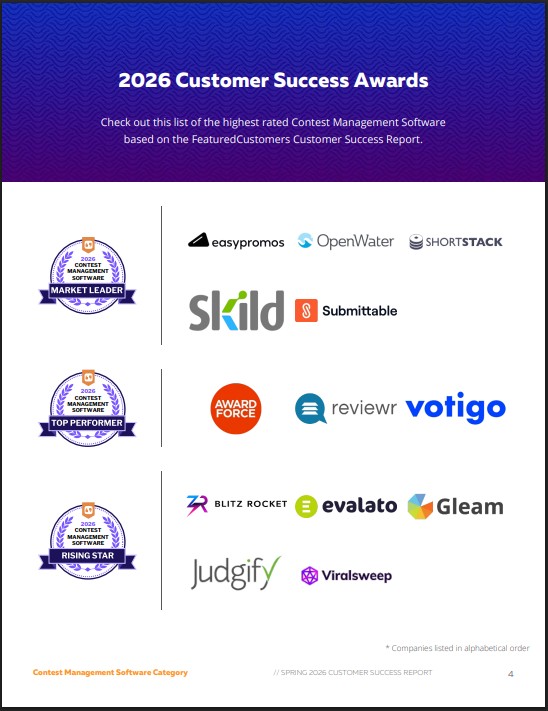
15 tools to streamline your contest workflow
You don't need one 'perfect' app. You need a stack that works. I've grouped these 15 platforms by how they actually function during an event.
AwardForce is a robust platform specifically designed for awards management. It excels at handling complex eligibility rules and multi-stage judging processes. It's a good fit for high-profile awards programs with significant budgets. Judgify focuses squarely on the judging experience, offering features like blind judging, rubric scoring, and detailed feedback tools. Its strength is ease of use for both judges and administrators.
Qualtrics is a powerful survey and data analysis platform that can be adapted for contest judging. While not purpose-built for contests, its flexibility and advanced analytics capabilities make it a viable option. Jotform and Google Forms are useful for simpler contests, particularly those focused on collecting basic information and submissions. They’re affordable and easy to use, but lack the advanced features of dedicated contest platforms.
Submittable is excellent for managing submissions, especially those involving creative work like writing, art, or film. It offers robust workflow automation and collaboration features. Eventbrite and Cvent are geared towards event-based contests, handling registration, ticketing, and event logistics. SurveyMonkey and Typeform are alternatives to Qualtrics, providing survey and form-building capabilities.
Smartsheet is a work management tool that can be used to track progress, manage tasks, and collaborate with team members. Slack, Discord, and Microsoft Teams are essential for real-time communication between organizers, judges, and participants. Zoho Forms is another solid form builder, offering a range of integrations and customization options. Finally, keep an eye on emerging platforms – the contest tech space is evolving rapidly.
Contest Management Software Comparison - 2026
| Software Name | Submission Management | Judging Features | Communication Tools | Reporting/Analytics | Ease of Use | Price Point |
|---|---|---|---|---|---|---|
| Qualtrics | Robust, form-based submissions | Advanced scoring options, blind review support | Integrated survey communication | Detailed data export, statistical analysis | Moderate learning curve | Mid-Range |
| SurveyMonkey Apply | Streamlined application intake | Basic scoring, limited customization | Email integration for updates | Simple reporting dashboards | Very easy to use | Low Cost |
| Submittable | Excellent for creative submissions, workflow focused | Collaborative judging, scoring rubrics | Direct messaging with applicants | Comprehensive reporting, data visualization | Moderate, workflow-driven | Mid-Range |
| JudgingPanel | Designed specifically for competitions | Specialized judging interfaces, conflict of interest tools | Dedicated judge communication platform | Detailed scoring breakdowns, ranking reports | Higher learning curve, feature-rich | Mid-Range to Enterprise |
| Eventbrite | Good for events with submissions | Limited judging features, relies on external scoring | Event-focused communication tools | Basic attendance and registration reports | Easy to use for event management | Low Cost to Mid-Range |
| Google Forms + Sheets | Simple form creation, basic submission collection | Manual scoring required, limited features | Email notifications, basic collaboration | Data analysis in Sheets, requires manual work | Very easy to use | Free |
| Typeform | Visually appealing forms, conversational flow | Limited judging features, best for qualitative feedback | Integration with communication platforms | Basic analytics, data export | Easy to use, design focused | Low Cost to Mid-Range |
| Airset | Event and submission management combined | Basic judging tools, scoring and ranking | Integrated event communication | Reporting on submissions and event attendance | Moderate, event-centric | Mid-Range |
Qualitative comparison based on the article research brief. Confirm current product details in the official docs before making implementation choices.
Judging platforms beyond spreadsheets
Spreadsheets are simply not scalable or reliable for managing judging in all but the smallest contests. Digital judging platforms offer a range of features designed to streamline the process, improve fairness, and enhance the quality of feedback. These features include blind judging (hiding participant information from judges), rubric-based scoring, comment tracking, and collaborative review.
Judgify is a standout in this category, offering a user-friendly interface and a comprehensive set of judging tools. Qualtrics, with its survey and data analysis capabilities, can also be effectively used as a judging platform, particularly when combined with custom scoring rubrics. A major benefit of digital judging is the ability to collect and analyze data more effectively. This allows organizers to identify trends, assess the quality of submissions, and make more informed decisions.
Ensuring fairness and transparency is paramount. Blind judging is a critical feature for minimizing bias. Clear and well-defined rubrics provide judges with a consistent framework for evaluation. Audit trails – records of all judging activity – are essential for maintaining accountability. It’s important to select a platform that allows you to customize the judging workflow to meet your specific needs.
- Define clear judging criteria.
- Step 2: Create a detailed rubric.
- Step 3: Configure blind judging (if appropriate).
- Step 4: Train judges on the platform and the rubric.
- Step 5: Monitor judging progress and address any issues.
Keeping everyone in sync
Effective communication is essential for a smooth-running contest. Organizers, judges, and participants all need to be kept informed throughout the process. Communication tools facilitate real-time updates, answer questions, and foster a sense of community.
Slack, Discord, and Microsoft Teams are popular choices for contest organization. These platforms offer channels for different topics, direct messaging for private conversations, and file sharing capabilities. Choosing the right platform depends on your team's preferences and existing infrastructure. A key benefit of these tools is their ability to centralize communication, reducing the risk of important information getting lost in email threads.
Clear and consistent communication is vital. Establish clear communication protocols from the outset. Provide regular updates on key milestones. Be responsive to questions and concerns. Consider creating a dedicated FAQ section to address common inquiries. A well-informed team and participant base is a happy team and participant base.
New tools from the 2026 competition
The 2026 Tools Competition introduced several new platforms. While the full results are on their official site, three specific tools stood out for solving common judging bottlenecks.
NovaJudge, a newcomer to the scene, impressed judges with its AI-powered judging assistance features. The platform uses machine learning to identify potential biases in judging and provide suggestions for improving fairness. Evalato, also a strong contender, focused on streamlining the awards management process, offering features like automated nomination tracking and eligibility verification. Finally, Scorely, a platform designed specifically for creative contests, caught attention with its unique visual feedback tools.
These platforms represent a trend towards more intelligent and automated contest management. AI-powered features are becoming increasingly common, helping organizers to improve efficiency and fairness. The focus on user experience is also evident, with many platforms offering intuitive interfaces and streamlined workflows. It’s worth keeping an eye on these emerging players – they could disrupt the contest tech landscape in the years to come.
Avoiding data silos
Using a collection of tools is great, but only if those tools can work together seamlessly. Data silos – where information is trapped in separate systems – can create inefficiencies and errors. Integrating your tech stack is essential for creating a streamlined workflow.
Many of the platforms mentioned earlier offer API integrations, allowing them to connect with other systems. Zapier and IFTTT are popular automation tools that can connect apps that don't have native integrations. For example, you could use Zapier to automatically add new submissions from Jotform to a spreadsheet in Google Sheets. Data synchronization is also important – ensuring that information is consistent across all your systems.
Consider the integrations offered by each platform before making a decision. Look for tools that integrate with your existing systems, such as your CRM, email marketing platform, and payment gateway. A well-integrated tech stack can save you time, reduce errors, and improve the overall efficiency of your contest organization.
Where contest tech is headed
The contest tech landscape is constantly evolving. Several emerging technologies have the potential to transform the way contests are organized and judged. AI-powered judging assistance is likely to become more sophisticated, providing judges with even more insights and helping to identify potential biases. Blockchain-based voting systems could enhance transparency and security, particularly in contests with large numbers of voters.
Virtual reality (VR) event platforms could create immersive and engaging experiences for participants and judges. Imagine attending a virtual awards ceremony or judging a design competition in a virtual showroom. While still in its early stages, VR has the potential to revolutionize the contest experience. Another area to watch is the use of data analytics to personalize the contest experience for participants.
We should be skeptical of the hype. VR and blockchain are only useful if they solve a specific problem for your judges. The goal is a fair contest, not a tech demo.


No comments yet. Be the first to share your thoughts!